



In our increasingly digital world, the need to sign documents electronically has become more prevalent. Whether you're working remotely, traveling without access to a printer, or simply want to avoid the hassle of dealing with physical paper, having a reliable method to sign documents on the go is essential. In this blog post, we'll explore the various scenarios where electronic signatures are necessary, discuss who benefits most from this technology, and provide a step-by-step guide on how to sign your documents using Tiny Scanner.
When Do You Need an Electronic Signature?

Electronic signatures are useful in many situations, particularly in professional and personal contexts. Here are a few common scenarios:
Remote Work: As more companies adopt remote work policies, employees need to sign contracts, agreements, and other documents without being physically present.
Traveling: Business professionals who travel frequently may need to sign documents while on the road, without access to traditional office equipment.
Urgent Signatures: When a document needs to be signed and returned quickly, electronic signatures can expedite the process.
Convenience: Even in a traditional office setting, avoiding the hassle of printing, signing, and scanning documents saves time and resources.
Who Benefits from Electronic Signatures?

Electronic signatures are beneficial to a wide range of individuals and professionals, including:
Freelancers and Consultants: These individuals often work with clients remotely and need to sign contracts, invoices, and agreements regularly.
Business Executives: High-level managers and executives who need to approve and sign documents on the go.
Legal Professionals: Lawyers and paralegals who manage a large volume of documents that require signatures.
Real Estate Agents: Agents and brokers who need to handle paperwork quickly and efficiently, often while out in the field.
Healthcare Providers: Doctors and administrators who need to sign medical documents and forms securely.
The Benefits of Using Tiny Scanner for Signing Documents
Tiny Scanner is a powerful mobile app that transforms your smartphone into a portable document scanner and signature tool. Here are some key benefits of using Tiny Scanner for signing your documents:
Portability: With Tiny Scanner, you can sign documents from anywhere, whether you're in the office, at home, or on the go.
Ease of Use: The app is user-friendly, making it easy for anyone to quickly scan and sign documents without any technical knowledge.
Security: Tiny Scanner ensures that your documents are stored securely, and electronic signatures are legally binding and compliant with various regulations.
Efficiency: Save time by eliminating the need to print, sign, and scan documents. Everything can be done directly from your smartphone.
How to Sign Your Documents Using Tiny Scanner
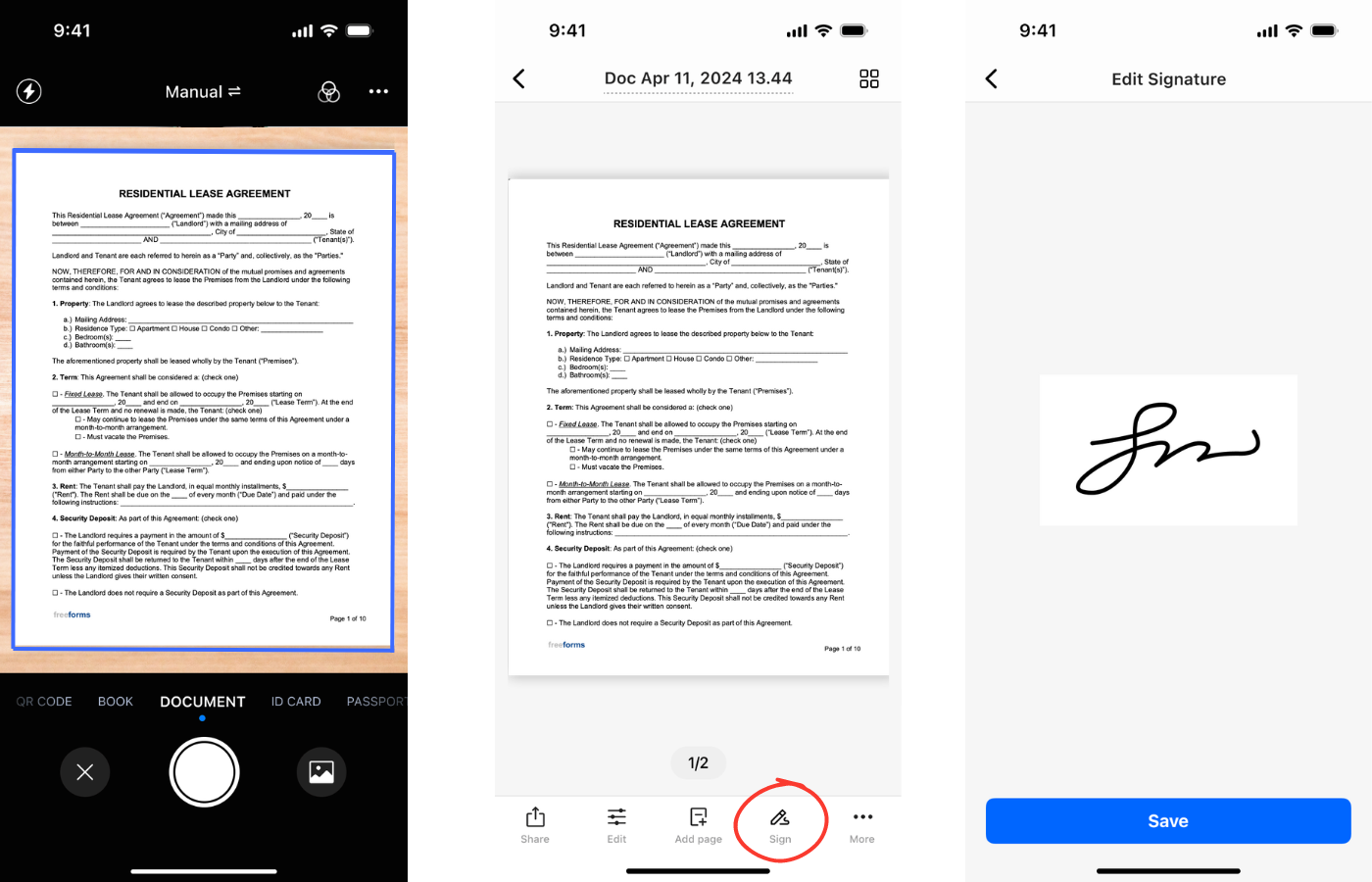
Follow these simple steps to sign your documents using Tiny Scanner:
Scan Your Document: Open the app and use your phone’s camera to scan the document you need to sign. Ensure the document is well-lit and free from shadows for the best quality scan.
Adjust and Save: After scanning, you can adjust the document’s edges, brightness, and contrast. Once you’re satisfied with the scan, save the document within the app.
Add Your Signature: Open the saved document within Tiny Scanner. Select the signature option, which allows you to draw or scan your signature. If drawing, use your finger or stylus to create your signature directly on the screen. You can also scan your handwritten signature. Place the signature in the appropriate spot on the document.
Save and Share: After signing the document, save it again. You can then share the signed document via email, cloud storage, or any other method supported by the app.
By following these steps, you can easily sign any document, anytime, anywhere. Tiny Scanner makes the process seamless and efficient, ensuring that you can handle your paperwork without any hassle.
Conclusion
Electronic signatures are a modern solution to the traditional challenges of document signing. With Tiny Scanner, you have a reliable tool that offers convenience, security, and efficiency, all from the palm of your hand. Whether you're a busy professional or simply someone who values convenience, Tiny Scanner is an invaluable tool for managing your document signing needs. Download the app today and experience the ease of signing documents on the go!